
Posts Tagged ‘rails’

Azimuth Treasure Hunt App: Release the Hounds!

Posted Tuesday, October 21st, 2008 by Arin Sime

As Eric already indicated in a previous post, this past weekend 4 members of the OpenSource Connections team competed in Rails Rumble 2008.  We built a Ruby on Rails app in less than 48 hours, which we called Azimuth and you can see it online here.


Azimuth is a fun little app that allows you to create “treasure hunts” for your friends, where they get SMS text messages indicating what the next clue is.  They have to go find the “treasure” related to that clue, and then text back to Azimuth that they found it.  To prove they found it, they have to either text back the latitude and longitude of the treasure, or text back a “key” word, which presumably the person who organized the hunt would have left at the site of the treasure.

It was a lot of fun building the app, and although it was an intense weekend, I think we all really enjoyed it. 


But to put Azimuth to the test, I decided on Monday night to setup a treasure hunt for my sons and some neighborhood kids.  I hid five post it notes around my house, each with a “key” written on it.  I opted to go for keys instead of lat/lng coordinates since I was doing everything in a limited geographic area, and I don’t have a gps device.  But for wider hunts, you could also use lat/lng.


Then I got my sons and a few of their friends together, gave them my cell phone, and told them how it worked (in case you’re wondering, yes, my son is wearing a box in the picture.  he does own clothes, he’s just building his own halloween costume and likes to wear it!).  My sons haven’t texted much before, but two of the girls from the neighborhood who were over at our house already know all about texting.  So they had no trouble with my phone.


It was great watching the kids as the ran from one part of the house to another trying to figure out the current clue.  After they found it, they would text back to azimuth a message like “azimuth1 piano”. This indicated that they had found the blue post-it note I hid on the piano, which used the “treasure” keyword piano.  The “azimuth1″ prefix on the message is required for all messages. This allows the free SMS toolkit we used, Zeepmobile, to know what software app to send the message to.  Our code then receives the text message on a landing page and processes it.  If the code determines that the key the kids typed was correct, then our website immediately sends them a follow up text with the next clue.  If they mistyped the key (which they did at one point), then a text message gets sent back letting them know to try again.


The kids absolutely loved the game, and I’m probably going to get in trouble with their parents because they went home asking to borrow Mom and Dad’s cell phone and play another game.

My oldest son really likes the whole idea, and so he immediately went about setting up his own treasure hunt.  He and I typed the clues into the azimuth website, and then sent the kids on another hunt around the house.


Regardless of whether or not we rank well in the Rails Rumble contest, I hope we will be able to continue hosting this site somewhere and begin to more actively promote it, since I think a lot of people would enjoy it.  The code isn’t bug free right now, but I think it’s actually pretty impressive how close we came to a bug free solution in only 48 hours.  That says a lot about the ease of Ruby on Rails, as well as the quality of my teammates. 

Speaking of my teammates (who rock), here’s a photo of the team having a toast at the end of the celebration.


From left to right:  Arin, Michael, Youssef, Ashish, and Eric.  And just for the record, Michael wasn’t actually part of the Rumble team, he was there working on another project for the weekend (Rumble teams are only allowed four members).  Don’t we kind of look like the power rangers in our multicolored shirts?

To wrap up, is Azimuth just for kids treasure hunts?  Heck no!  I can see all kinds of people having fun with Azimuth: college fraternities or sororities, high school kids, scout groups, co-workers, pretty much any group of people looking for a fun twist on scavenger hunts.  You can setup a hunt around your house like I did, or around your town, or even around the world!  There’s pretty much no limit to the fun you can have with this.  My wife is already planning a neighborhood treasure hunt for the next block party.

Oh, and please vote for our app in the Rails Rumble contest!  Youssef really wants to win.  Seriously.  The guy woke us all up early Sunday morning saying “I want to win!”  He must want that kung fu lesson with Chuck Norris.

Securing CC.rb from the world

Posted Thursday, August 28th, 2008 by Eric Pugh

I love CruiseControl.rb, but one of the things I’ve found is that it exposes via the web interface a lot of what is potentially confidential data. From the cruise_config.rb containing accounts on our SVN server, to being able to browse source files, which would include database.yml, again, exposing usernames and passwords.
(more…)

Rails vs. Django: a Beginner’s Point of View

Posted Monday, August 4th, 2008 by Youssef Chaker

For an agile web developer two frameworks are available for quick and easy deployment of a new website: Ruby on Rails for the Ruby fans and Django for the Python fans. These two tools should provide the same functionality and as someone who’s been working on two projects for the last month, each using one the frameworks, I have had the experience of starting from scratch on both of them and trying to learn both in parallel (or at least one right after the other without acquiring more experience in one and becoming biased for one over the other). So what has this experience taught me?

Deployment
It is very easy to start an application using both Rails or Django:
rails myapp vs. django-admin.py startproject mysite
even though one is wordier than the other it is pretty simple to start the project with all the directories and files needed automatically generated.

Starting the Server
This task is as simple as the previous one:
ruby script/server vs. python manage.py runserver
in both cases there is a call to the language in use, then passing a command. In Rails’ case the command is an executable found in the “script” directory whereas in Django’s case the command is an argument passed to the Python manager.

Configuration
Both frameworks provide a place to configure the application. Rails provide an entire directory to configure the database setup and the Rails environment whereas Django provides a settings.py file where all the configurations can be present but also provides the option of having a config directory for multiple personalized configurations.

Updating the Database
Yet another simple task:
rake db:migrate vs. python manage.py syncdb
In this case we notice that with Rails the call is actually to “rake” whereas for Django it is still consistent with the previous format. But we’ll see that Rails is also consistent where “rake” is called for everything relating to the database.

Creating Models
Where some of the differences begin:
With Rails you create one application that can have multiple controllers, models and models and link to each other using ruby script/generate * (where the * differs depending on what needs to be generated).
Whereas in Django you create multiple applications which each has its own models and views using python manage.py startapp myapp

Documentation
It seems that Rails is more widely used which results in more available resources online for documentation and help. None the less, the Django documentation site is very extended and provides sufficient help.

The Dirt
In the case of Rails I started the project from scratch by first following with the example in the book Agile Web Development with Rails, Third Edition and then applying what I learned to the project I was working on. Whereas in the case of the Django project, I was put on it late in the development process and tried to learn the language and at the same time understand what was already done on the project. My experience with both has been limited and what I have found is that the Rails magic seems to be the difference maker for most people. The majority are not comfortable with that “unknown” but I have seen some magic done with other languages like Java, although it is not the same type but in either case there is something in the background that is doing some sort of work for the programmer. And I have become comfortable with such a setting and because I have seen a bit of how programming languages interpreters work I understand and appreciate the Rails magic.

Even though I was more productive using Rails than I was using Django, which may have influenced my opinion about them, I am still willing to give Django a chance. Both are great tools for developing web applications in an agile manner. My recommendation though, if I have to make one, will go for Ruby on Rails, just because I was more comfortable with it.

Rails Deployment Tips with RimuHosting VPS

Posted Friday, July 11th, 2008 by Eric Pugh

We’ve been using RimuHosting.com’s VPS servers for a couple of small prototype style RoR applications that don’t warrent the “full” treatment of their own dedicated servers in a clustered, redundent, scalable, etc environment. An example is my side project learning about the Semantic Web and Microformats: HighTechCville.

One of the parts that I really like about RimuHosting is there very complete use of the Webmin administrative console. The more I work with it, the more I like it. While the GUI isn’t anything incredible, it is very serviceable. And you can pretty much do most SysAd tasks from it, from installing packages, which really surprised me, to setting up log file rotation.
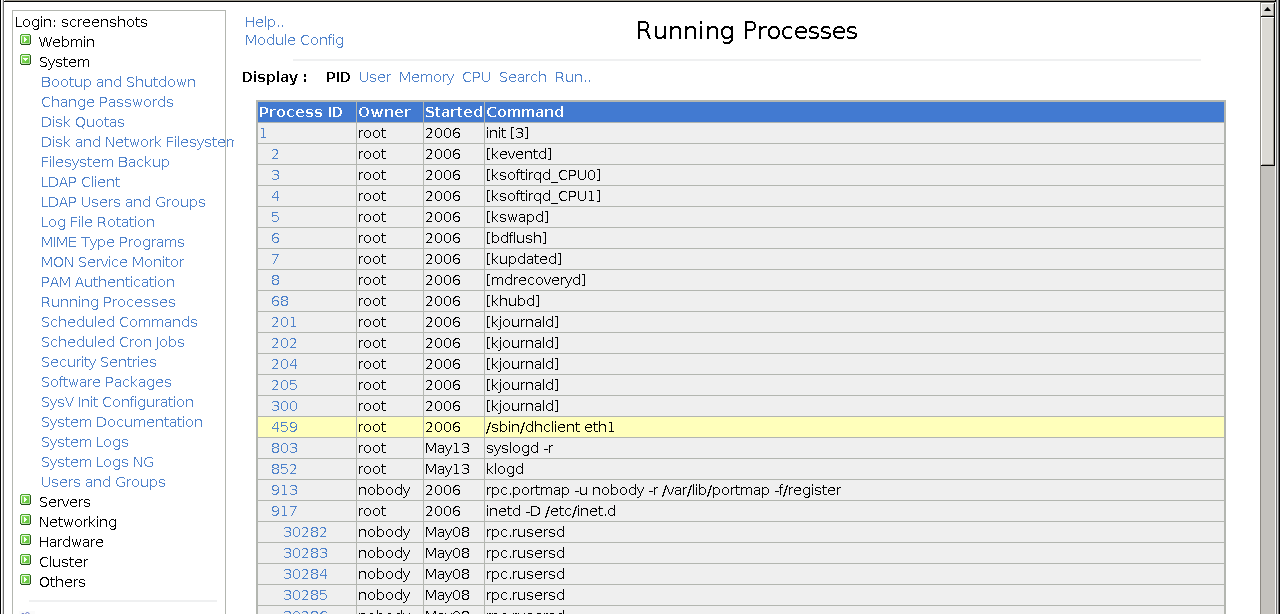
So here, in no specific order are some tips for folks doing a fairly plain jane RoR deployment on a RimuHosting VPS:

  1. Don’t forget Log Rotation! We did some load testing for a day on one app and generated a 1.2 GB production.log! Webmin provides this under System -> Log File Rotation. You can easily rotate all your mongrel logs by doing /opt/apps/hightechcville/shared/log/mongrel.800*.log. By gzipping them you get much smaller files, and they will be pruned after 4 rotations. I did have an issue with BackgroundRB not being happy with the log file being moved under it, however I get so little output from that that when BackgroundRB restarts it resets the file.
  2. Process Monitoring! Under Others -> System and Server Status is the ability to monitor how your server is working. You can do both local monitoring, for database, processes, memory usage, but also you can check if you RoR app is up and running by adding a Remote HTTP Check, and just supply the url of your application. What’s nice is you can add a text pattern to look for, or to ensure isn’t there, so you can check and verify you are NOT getting the usual Service Down or An Error has happened page. Of course, if your box goes down in a bad way, then you may not be notified, but it’s at least a quick and easy first step.
  3. Cron related tasks. Often we need timed processes to do a bunch of work. Before investing in the complexity of integrating something like BackgroundRB, can you do what you want via a Ruby script or write a Rake task? The invoke it from Cron. Alternatively, if you don’t want something external to your Rails app, just add the periodic task code to some sort of RecurringJobController, and invoke it from cron via wget localhost:3000/recurring_job/run call! Sure, your mongrel will block, but if you have a cluster, who cares. You can also schedule this via a HTTP Remote Process check ;-)
  4. Tweak Postfix? We really like the ExceptionNotification plugin for RoR, getting immediate notice of errors on lower traffic sites is great. However, we found that we had to tweak the local_recipient_maps setting to get email to be sent out, otherwise you get a 550 server error. Just go to Servers -> Postfix and choose edit config files. You want to edit the main.cf and set local_recipient_maps= so it is blank.

Got your own tips for easily setting up a reliable RoR app on a VPS, please let me know in the comments!

Deploying Ruby to DreamHost

Posted Friday, May 30th, 2008 by Arin Sime

Recently, I completed my first Ruby on Rails application, which you can see here. It’s not a complex application, basically it’s a survey of political candidates with three data models: candidate, question, and answer. Pretty straightforward.

I built the Ruby app using Scaffolding, which was very easy and I liked alot. Scaffolding gives you the nice pre-configured classes and pages for adding, editing, and deleting records, but my survey doesn’t line up exactly to that model (ie, I don’t want anyone to go edit or create the questions on the survey, and I wanted to create a flow from creating your candidate record to then answering each question in the proper order). With some help from Eric, I soon got into the REST mindset and got the application working properly. That was cool.

I didn’t consider deployment too much until I had the app completed and working on my local instance. My plan was to just deploy it to my DreamHost account, which I assumed would be easy. I’m used to deploying .NET applications, which is extraordinarily simple, and it didn’t occur to me at first that Ruby might not be as easy. After copying my files out to DreamHost, I found this wiki page of theirs. I was a little bit annoyed at first after reading that, because I realized I would have to run a bunch of commands to get rails running and the permissions correct.

Fortunately, as Eric pointed out to me, DreamHost already has a solution. Now they use mod_rails, and all you need to do is copy out your code, check the box for mod_rails, and then use their configuration panel for that domain to point to the public directory used by ruby on rails. After doing that, everything worked great and I have to say that I am now pretty sold on Ruby on Rails. One thing I’ve always liked about .NET is that it’s pretty easy to deploy. Now that I’ve seen Ruby on Rails can be easy to develop and also easy to deploy (at least with DreamHost), it’s a much more attractive language to me.